Marquee map selection
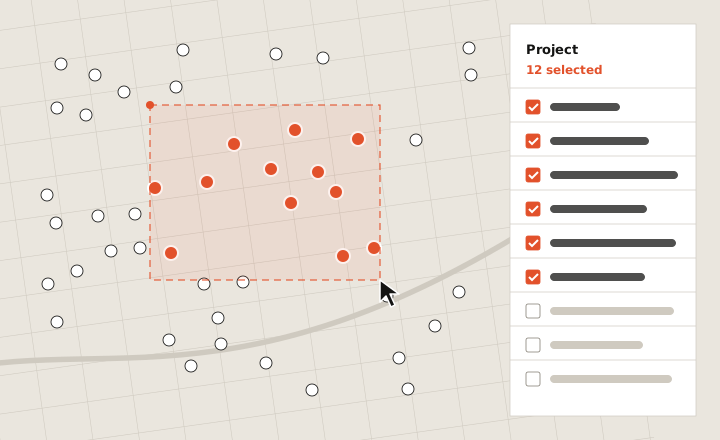
One drag on the map selects every feature inside it, instead of a click per feature. The first way to select in bulk directly on Google Earth’s 3D map, built to fit with every existing way to select, on web and mobile.
01Context
Selecting many features at once already worked in the project panel: checkboxes, select all, or dragging down the list. What you couldn’t do was select them on the map itself, where you actually see your sites and how they sit next to each other. There, it was one click per feature.
Earth also needed a temporary drawing state for features on the way, and marquee selection would be the first thing built on it, so it had to set the pattern.
02Approach
Marquee selection joined three ways of selecting that already existed, and all four had to share one selection. Drag over features on the map and they light up in the panel. Tick another one in the panel and it joins what you dragged.
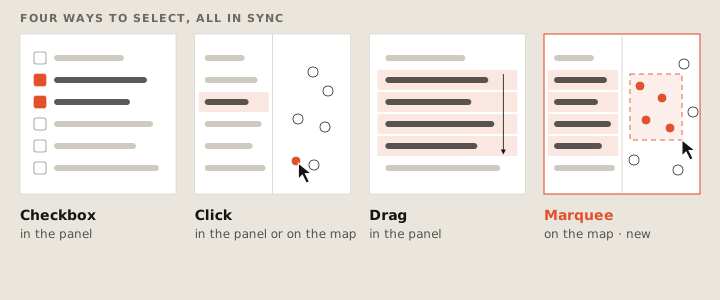
It also had to work on web and on mobile, where dragging usually moves the map. It had to fit both of Earth’s layouts, the streamlined one for new users and the productivity one for heavy users. And it couldn’t collide with measuring and drawing tools that also work from the middle of the screen.
Each of those was worked out by prototyping, testing and iterating with a UX designer and a PM. The implementation, end to end, was one engineer.
03Outcome
Marquee selection is live in Google Earth on the web. One drag picks up every feature it covers, and the whole group can then be restyled in one edit, or hidden, copied, deleted or zoomed to together.
It’s also the first feature built on Earth’s new ephemeral drawing state: shapes drawn on the map that exist only while you’re using them and are never saved to the project. That’s what makes room for other tools that need to draw on the map.
Cut and fill
Say hello.
Working on something for the built environment? I’d love to hear about it.